Friday, November 17, 2006

TCP/IP Encapsulation Limited by Distance?

Summary: serial tunneling or TCP encapsulation is NOT directly affected by distance. However, it is affected by "hops" or how many routers and segments it goes through. To reduce the effect "hops" have on your TCP/IP Encapsulation, you need to set the correct options in your Digi Device Server. These are NOT standard defaults since what works best for Wide-Area-Network is not best for local direct Ethernet links.

What is serial TCP/IP encapsulation? It is also called serial bridging or serial tunneling. Think of it as the modern IP equivalent to old short-haul modems or leased line modems. At each end you have a "modem", you connect a serial cable to each, and you create a virtual serial link running from end to end.
Diagram showing serial tunnel

During a webinar I gave, a traffic-industry user asked if serial TCP encapsulation is limited by distance. If he serial bridges between 2 intersections of a road, things work fine. However, if he tries the same serial bridge between an intersection and the home office, then serial bridging does NOT work. So he was wondering "what is the distance limit for serial bridging or encapsulation?"

The simple answer is "There is no distance limitation". However, the longer the distance you move your serial encapsulation, the more routers and network segments (hops) your traffic moves through. The more hops your traffic moves through, the more variable latency (or delay or jitter) is introduced between consecutive network packets. This affects the timing and different protocols and software implementations react differently to it.

Let me just throw some hypothetical numbers together. Let's say the device sends data as a block of 100 bytes; the receiving device will loop and collect this data. Of course the receiving device cannot just wait for 100 bytes - what if the line breaks? It could sit there forever waiting for the end of the message. So various timers are coded to enable the receiving device to understand failure and abort receiving. Let's say the receiving device waits at most 20 milliseconds for the next byte. On a direct serial link this is very common - once the sending device starts sending data it is very unlikely that even a 2 or 3 millisecond gap will appear between bytes.

Enter serial encapsulation - either by radio or Ethernet or any IP-based media. All of these technologies are packet-based and most include some form of error-retry. So now the serial bytes collect in a buffer up to some point, then a chunk of them move together as one packet. Ideally, the full message moves as a single packet. However, if the message becomes split between 2 or more packets it is possible a gap will be detected by the receiving device. So for illustration we'll say the 100 bytes is split into 4 x 25-byte packets. On a single-hop network, there is much less opportunity for timing delays to open gaps in the final serial data. This diagram shows a small gap between the 25th and 26th bytes:
Diagram shows less variability with single IP hop

But running the serial encapsulation through many network hops greatly increases the accumulated delays added to each packet. So each hop has the opportunity to increase the latency and lag. This diagram shows a much larger gaps that may occur when the packets create the serial traffic at the remote end:
Diagram shows less variability with single IP hop

How to solve this problem? On the Digi Connect products, you'll be using one of these serial port profiles: TCP Sockets or Serial Bridge. Under the Advanced Serial Settings you need to enable the check box labeled: [ ] Send data only under any of the following conditions. If you do not check this option, the Digi Device Server purposely fragments the serial data into many TCP segments to provide more realistic end-to-end performance on direct Ethernet links. However, since you want to move data through a wide-area network, you are less concerned with raw throughput than in preventing message fragmentation. You may also be interested in creating fewer TCP/IP packets to send more serial data. Changing this setting accomplishes both of these things.

You now have 2 options to define when TCP packets are moved:
  • "Send when data is present on the serial line" allows you to define an end-of-message pattern such as a carriage-return (\r or \r\n, etc).
  • "Send after the following number of idle milliseconds" allows you to define an idle or quiet time to wait before sending data. This second option is generally safest and I find a value of 10 or 25 milliseconds to be ideal with most automated devices.

Note: do NOT change the setting in the "Send after the following number of bytes" field! This is rarely useful and it does NOT mean (when unchecked) that the Digi Device Server must see 1024 bytes before it sends anything. I have had too many users change this to 1 and then wonder why they have a huge amount of network traffic!

Friday, November 10, 2006

Application Pitfalls: Serial DF1 over WAN

Digi's wireless group was asking me why AB/DF1 didn't always work over radio when per the specification, DF1 has a nice end-of-message pattern. One would think moving serial DF1 through radio or cellular-IP would be natural and painless.

However, the problem I see watching Windows applications use the serial API (via the PortMon utility) is that they ASSUME a small delay or gap between the (DLE)(ACK) bytes and the response from the slave.

So the application uses the incorrect algorithm:
  1. Read 2 Bytes
  2. Ask Windows to notify application when more data comes
  3. Loop, reading buffered data and waiting until full response seen
The problem with this algorithm is it assumes the response will NOT have been received by the time the application sees the 2 byte (DLE)(ACK). Because we're dealing with radio or IP system that make effort to packetize data there is a high probability that the (DLE)(ACK) and the slave response arrived at the same time within the same packet without any noticable gap. Therefore, Windows NEVER notifies the application of that more data has arrived ... because no more ever comes! The full response has already been received and buffered. The application makes the false assumption that measurable time will occur between step #1 and the start of loop #3.

The correct algorithm would be:
  1. Read 2 Bytes
  2. Loop, reading buffered data and waiting until full response seen
This works because it handles both the situation of no response, a response already received and fully buffered, and a response trickling in over time.

See Also:

Thursday, November 09, 2006

City-wide WiFi - it's not Ethernet

One of my customers is struggling to IP-enable a few dozen Ethernet PLC via one of these new fangled city-wide WiFi systems that are all the rage now. Looked good on paper, but they can only keep the PLCs online for about 20 minutes at a time.

Why? Is the WiFi system defective? Of course not ... it is just behaving more like Wide-Area-Network than Local-Area-Network. I am not directly involved in this, but I'd wager the problem is neither the WiFi nor the PLC. The problem is the host software making Ethenet LAN assumptions about the system. I should offer to go out and do some latency tests; I'd wager the system has high and variable latency more like satellite or cellular.

So industrial control application developers beware, migrating your Ethernet-enabled, LAN-friendly applications to be true IP-enabled, WAN-friendly applications will become more important every time another city annouces the installation of a city-wide wireless infrastructure.

Monday, November 06, 2006

Cellular-IP Friendly Apps - Retrying Socket Opens

Most industrial applications allow the user to set a slow poll rate – such as one poll per 5 minutes. This allows a user to budget a cell plan at 5MB per month and be quite assured of not going over. Unfortunately, this steady-state poll rate is unrelated to initial TCP/IP socket connection opens!

If the remote device is powered down or the TCP socket open fails for any reason, most applications will attempt to reopen the TCP socket continuously. On Ethernet this may make sense; the more frequently the open is retried, the sooner the failed connection will recover. Most Ethernet-based applications will retry opening a TCP socket every 5 to 30 seconds forever. However, for cellular you are paying for all traffic entering the cellular system. It is not Cingular or Sprint or Verizon's fault your remote device is off-line. You will be billed for each and every TCP retry. I have literally seen applications create up to 1000 MB of traffic each day attempting to reopen a TCP socket to an unreachable remote IP. On a 5 MB per month plan, this 1GB of overage could easily cost you $1000 or more for the month!

Recommendation: all applications must include a user-settable option to delay attempts to reopen TCP sockets. This value can default to no-delay, but users must be able to set a delay of at least 1 hour between retries. This enables the user to define and stay within their data usage budget regardless of success or failure of the TCP connection.

Impact: On Ethernet this should have no direct consequences since the recommended default is no delay. Cellular users must adjust this retry delay to match their data traffic expectations and their cell plan budget.

For example, an application polling 10 Modbus registers per 5 minutes via TCP/IP creates about 198 bytes per poll. This works out to 2376 bytes per hour or a little under 2 MB per month. This is a very safe poll rate when paying for a 5 MB per month plan.

Therefore the desired TCP reconnect scenario should also create no more than 2400 bytes per hour. Consider that a 20-second timeout under Windows creates at least 120 bytes of traffic to an off-line remote. Windows sends a 40-byte [SYN] packet and retries the same 40-byte [SYN] in roughly 3 and then 8 seconds from the previous [SYN] packet. Increasing the timeout to 30 or more seconds creates a fourth 40-byte [SYN] packet sent about 18 seconds after the third. So forcing an application to only attempt one connection per 5 minutes will create from 1440 to 1920 bytes of traffic per hour. This will not break our budgeted cell plan.

Tuesday, October 31, 2006

Modbus Bid Spec Suggestions

A large customer asked me for advice on bid-specing the use of Modbus/TCP. They are expecting HVAC and other non-production systems to provide "gateways" with Modbus/TCP to simplify central HMI and data collection. Experienced field people know this is not quite as easy as it sounds.

So I stepped back and put myself in their shoes - if I were trying to design a new assembly plant and I hoped to monitor HVAC, chemical tank farm, and such by Modbus/TCP, then what issues would hinder this? What details NOT included in the http://www.modbus-ida.org/ protocol specification would complicate true interoperability? I have many experiences of integration problems with Modbus masters and slaves from 2 different vendors not quite talking as expected. Usually the customer ends up PAYING one vendor or the other to change; or the customer has to buy a 3rd party box to fix the difference of opinion.

So how to avoid this up front? Here is the list I created:

  1. The required interface is Modbus/TCP running on standard Ethernet II frames and following the published specification at http://www.modbus-ida.org/.

  2. All devices must support at least 100M half-duplex Ethernet and if auto-negotiate is supported, they must be manually configurable to force 100M Half-Duplex.

  3. If the supplied product uses serial Modbus/RTU or Modbus/ASCII, then vendor must supply a configured, tested, and powered Modbus Ethernet-to-Serial bridge (such as the Digi One IA, model 70001862) to bridge this to Modbus/TCP on Ethernet.

  4. All data must be available and/or mirrored within the Modbus 4x or "Holding Register" memory area. The other areas can be optionally supported, but all 0x, 1x, and 3x data must be readable in the 4x memory area. For digital writes, support of single-bit writes (function 5) to the 0x area are acceptable. Products that require access to the 1x and 3x area to operate are not acceptable; access to 1x/3x area must be optional.

  5. Modbus 32-bit longs and floating points must be available in Modicon 984 Compatibility format, which means as two consecutive 16-bit big-endian registers, with the low word in the first register. Other forms (Daniels/Enron or high-word first) can exist but must be optional.

  6. All gateways or converters bridging non-Modbus data to Modbus must not provide stale data and must not require special "status registers" be monitored to confirm data validity. If the source device of the non-Modbus data is unavailable or the data is out-of-date, then Modbus/TCP requests must return an exception such as 0x0B until the source data is valid again.

  7. Register 4x00001 must exist and be readable to allow simple, predictable "comm tests".

  8. Software tools must function properly with slaves only supporting Modbus functions 3 and 16. Requiring diagnostic function 8 support is not acceptable.

  9. Software tools must be configurable to write a single register as either function 6 or 16.

  10. Software tools must be configurable to limit reads and write to user selectable limits; for example, the software must accept being limited to reading 1 register per transaction and writing 1 register per transaction.

  11. Software tools must allow setting to the Modbus/TCP "Unit Id" to a value other than zero. This is required for Ethernet-to-Serial bridging.

  12. Software tools must use the Modbus/TCP sequence number and modify it between polls. The tool must not leave it set as 0 or 1 all the time.

  13. To support future wide-area-network usage, all "Masters" must permit TCP socket opens to take up to 30 seconds.

  14. To support future wide-area-network usage, all "Masters" must permit slave timeouts be set to at least 30 seconds.

  15. To support future wide-area-network usage, all serial slave devices must have a configurable "gap" or intercharecter delay timeout. The Modbus spec's "3.5 character times" is problematic when dealing with radio & other error-correcting media.

  16. All devices must be capable of transport via wireless bridging by common Ethernet radio systems such as 802.11 bridges and more traditional 900Mhz line-of-sight bridges.

Now, will all vendors be able to meet all of these requirements? Probably not since many of them are not required per the Modbus-IDA specifications. However, at least this brings the issues up front to be addressed during the bid award phase. If custom firmware modifications are required, it can be addressed up front and not during factory acceptance testing.

Monday, October 23, 2006

Cellular-IP Friendly Apps - Socket Open

Most applications attempt to open a TCP socket using the OS/Windows default timeout. This results in an unpredictable timeout. I looked through Microsoft's VS.NET documentation looking for the "How long?" answer ... and never found an answer. I suspect it depends on your version and service-pack levels. I did a web search to discover the truth and found people claiming Windows timed out in 2 seconds, 5 seconds, 10 seconds, 20 seconds, 20-30 seconds, and even one claiming 5 minutes. Sadly, most of these people were looking for a way to force Windows to use a connection timeout of 1 second or less - which will prevent their applications from working on normal wide-area networks.

Such short connection attempts are not suitable for cellular network where the first response packet from an idle remote tends to complete in 3-4 seconds during average conditions. Therefore even a 5 second timeout is too close to the norm to be suitable.

Recommendation: all applications must use an explicit, predictable timeout during a TCP socket open request. This value can be user-settable higher or lower, but for cellular should default to 20 seconds and be settable to at least 60 seconds for satellite.

Impact: On Ethernet this should have limited direct consequences since the timeout only has affect if the remote is not available. If having your application wait 20 seconds for an inaccessable remote is a problem, then enable a user setting to select either "local-area-network" or "wide-area-network" mode and adjust the default connection timeout as appropriate.

In a best case scenario, failing to wait long enough to open a TCP socket when the network is sluggish could prevent connecting for many minutes as sockets succeed to open, but the OS aborts the open before the successful response can come back from the remote. Keep in mind that over cellular the end user is paying for at least 120 bytes of data for every open attempt, and that TCP retransmissions likely make this 160 or 200 bytes.

In a worst case scenario, this aborting of opened sockets on a remote with limited resources risks tying up all resources with past failed opens. Remember, just because your OS timed out the open does not mean the remote device didn't allocate the connection resource and send a successful response. The lack of resources blocks new attempts by the application to reconnect until TCP keepalive or some other mechanism detects the broken sockets and frees up the resources.

Be warned that under cellular - as if in defiance of traditional faith in the reliability of the TCP state machine - TCP sockets break in rare occasions in ways that common OS will fail to detect! During cellular network hiccups, I have seen machines "hang" for 11 hours waiting for a TCP Acknowledgement that never comes! This is with TCP Keepalive enabled for 5 minutes even.

Some Visual Studio discussion: Just out of curiosity, I did some snooping around inside the Visual Studio .NET documentation. I didn't find a good answer, so cannot explain how to solve this problem.

Here is example VB.NET code to opean a TCP socket:
  • Dim tcpClient As New TcpClient
  • Dim ipAddress As IPAddress = dns.GetHostEntry("www.digi.com").AddressList(0)
  • TcpClient.Connect(ipAddress, 11003)
Notice we cannot ask the OS to wait "longer" or "shorter". The documentation says "The Connect method will block until it either connects or fails." A connection timeout results in a SocketException failure being thrown. The TcpClient class has ReceiveTimeout and SendTimeout properties, but these only relate to reads and writes on the connection and have no impact on the initial connection open. Suggestions to use the System.Net.Sockets.Socket class instead aren't helpful since this class also doesn't offer a simple connection timeout mechanism.

The only wait to define a predictable TCP socket connection timeout appears to be use an asynchronous design with BeginConnect and some form of external timer to call EndConnect at the desired timeout.

To rephrase myself, I am not saying the default Windows connection timeout is incorrect - I am saying evidence is that you cannot predict what timeout your customer will see if you don't explicitly define one. So while your application running on your computer may default to a nice 20 seconds timeout, what happens if your customer runs the same application on an older computer and sees a 3 second or 5 second timeout? The answer is they won't be able to reliably connect to cellular or satellite remote IPs, and either won't buy your product again or will call Tech Support.

Friday, October 20, 2006

Cellular-IP Friendly Applications - Intro

In theory, host applications using TCP/IP on Ethernet should work over wide-area networks which support TCP/IP. Unfortunately, most host applications are written and tested for Ethernet, not generic IP. When you move into cellular IP or satellite, the high and variable latency introduced causes many host applications to either fail or generate an order of magnitute more traffic than than they should.

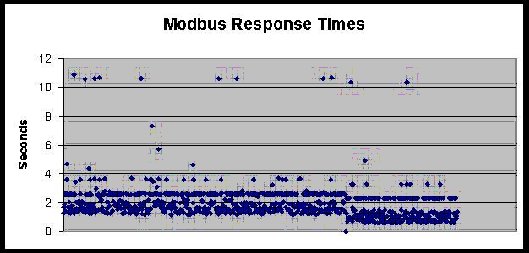
For example, here is a chart of 1000 Modbus/RTU polls over cellular TCP/IP. There is a random delay between polls of 30 seconds to 30 minutes. The patterns are rather striking: most polls complete in between 1 to 2 seconds, but there is clearly some systematic "aliasing" causing responses to complete in 2.8, 3.8, and 10.8 seconds.

chart showing Modbus times


After years of troubleshooting customers systems, I have been creating a running document and commentary on Bad things host apps do. I will be publishing these things over time in this blog. But to summarize:
  • The default OS timeout on opening TCP Sockets may be too short.
  • Attempting to open TCP sockets to unresponsive remotes must be a controlled process, since retries cost money.
  • Since all packets and retries cost money, all aspects of the implemented protocol must be controlled and adjustable.
  • OS stack calls may not return if the OS fails to detect a response or socket failure.
  • Responses from the remote could take 15 to 60 seconds.
  • TCP segment fragmentation and reassembly is exaggerated; can have many seconds of delay between fragments.
  • TCP sockets idle longer than 5 minutes often go away without error or detection.
  • Every byte your application sends (or resends) costs your customer money.

Thursday, October 12, 2006

Siemens PLC via Cellular

We succeeded in getting a Siemens S7-226 with CP243 and PPI serial up on the Digi Connect WAN, which is a cellular router for GSM or CDMA with local Ethernet and serial port.

In Summary:

  • To talk to S7-226 by serial PPI, you need a newer Siemens PC-to-PPI cable - the older one doesn't work. I am not sure why, but that is what we found. Using Digi RealPort we enabled a redirected COM port to the remote Digi Connect WAN's serial port, which is connected to the PPI port of the S7-200. We then defined a radio modem port within MicroWin using that COM port. Although a 30 second timeout would be ideal, MicroWin only gives options for 1, 10 or 100 seconds of timeout. You should probably select the 100 seconds to minimize your comm costs. Now MicroWin or Step7 can freely connect to and reprogram the S7-200. The high end-to-end latency of the cellular IP networks makes the performance pretty sluggish when compared to direct serial, but it works.
  • To talk to S7-315 by serial MPI, you need the special Siemens PC-to-MPI cable. Just as with the S7-200, we set up a redirected Digi RealPort, however we did NOT need to fool Step7 into thinking this was a radio modem. It just worked fine as is when given longer timeout settings.
  • To talk to CP243 by S7 protocol over ISODE on Ethernet, we enabled TCP port forwarding of port 102 on the Digi Connect WAN to the CP243 module. The CP243 is configured to treat the Digi Connect WAN as its Gateway IP. This also worked fine as is when given longer timeout settings.

Monday, October 09, 2006

Using Python to query Modbus slaves

I use Python ( http://www.python.org/ ) at lot in my testing. It is a language designed to make a programmer's life easy and the computer sweat - in other words, it is an ideal tool for test scripts and maybe a bad tool for "constant use" tools.

Stock python has no serial support. For serial, you'll need some serial tool like pyserial - this hides details of OS and allows Linux (or Windows) style serial calls on either OS. A web search of pyserial will turn up a download site - such as http://pyserial.sourceforge.net/ . The "Vaults of parnassus" is another nice source for Python tools including pyserial. http://py.vaults.ca/~x/parnassus/apyllo.py/

Creating binary messages is not hard in Python, but a bit ugly. You use lots of "chr(x)" function to build up a binary string and to parse a binary response lots of "ord()". Other than that, look at the spec at http://www.blogger.com/www.modus-ida.org for details of the actual protocol.

CRC-16 for Modbus (or DF1):
Here is my CRC16 routine including a few test cases (written with no regard for CPU speed, since that is not why one uses Python).

crc16.py as a ZIP file

Friday, October 06, 2006

Better not try to use "unlimited data"

When a potential customer starts talking to me about cellular data access to their telemetry devices, I start the discussion with the basic monthly costs of cellular data. Business cellular plans make you pay for what you use; every byte you send potentially costs you many. Of course, the natural reaction from potential customers is "Oh, that's no problem ... I'll just sign up for one of those 'unlimited plans' I see advertised all the time". When I point out these plans are available only for consumers, the natural reaction is to say "Oh, I just won't tell them this is for business ..."

I'll put on hold a moment the debate of "do unlimited data plans really exist?" and get back to cellular data access to telemetry devices. Today (and perhaps forever) cellular data access only makes sense if you have your data access well defined and under-control. If you poll X words of data every Y minutes, you will be able to select a monthly data plan that fits within a planned budget. If you connect to remote equipment for limited diagnostic maintenance and you understand that the cellular overage charges could cost you X dollars per hour, you will be able to manage your monthly bills. However, if you approach cellular data access to telemetry devices by saying you need to poll as much data as fast as you can, then this is NOT the correct technology for you. You are better to look at the various long-range Ethernet line-of-sight radios.

So back to the question of "do unlimited data plans really exist?" Hmm, unlimited - sounds nice, doesn't it. Yet an Internet search for "+unlimited +internet +cancelled" shows a growing collection of frustrated people with DSL or cable broadband, wireless PDAs, voice-over-ip (VoIP), and cellular plans who have had their "unlimited services" cancelled because they (ta-da) moved too much data. It seems unlimited doesn't really mean unlimited. I could provide links to such information, but the sites tends to be full of wild ranting language, plus I don't want to single out just a few companies. Do the search above and you'll find examples for any type of service you desire.

While I can empathize with the ranters who've found out that unlimited just means "without a predefined limit", as a network professional I understand the basis for these service cancellations. It would be nice if the marketing hype-sters could be honest enough to stop using the term "unlimited", but then no user would sign up for an honest broadband service stupid enough to define limits when competitors are shouting about "unlimited plans".

All IP-based broadband systems consist of a series of hops or links, each with a predefined maximum data throughput. All commercial broadband services try to handle as many customers as they can sign up. Therefore the performance a user sees is merely a function of how many other users are active at that instant, how much data they are trying to push through at that instant, and what is the limiting throughput of the system bottlenecks. As a business person seeking to make money, would you prefer to keep 100 users paying $80 monthly to each move 100MB of data per month (10,000MB/month), or prefer to keep the one user paying $80 monthly to move 10GB (10,000MB) of data per month? While this is an extreme example, as soon as a few of the 100MB/month users complain to the broadband service about their high-speed internet seeming pretty slow speed, the solution is obvious to the business-minded. Canceling the "unlimited service" of the one user moving 10,000MB/month will effectively double the performance of the other 100 users with no added expenses and a mere loss of $80 per month of income. Failing to cancel the "unlimited service" of the one heavy user risks causing 10 or 20 of the other 100 light users to change services with a potential monthly income loss of hundreds or even thousands of dollars. I am not saying this is honest to cancel "unlimited service" based on high usage. I am just saying it is understandable and makes business sense.

How is this cancellation legal? Easy - just read the huge terms of service contract you agree to when you sign up for unlimited data service. To generalize some typical clauses in an unlimited cellular service plan:
  • You agree to only use it for internet web browsing and email checking
  • You agree to not download or upload files
  • You agree to not use streaming media or peer-to-peer file sharing
  • You agree to not run any application servers or data services
  • You agree to not use the service as a replacement for a wired data circuit
  • You agree to not use the service as a backup for a wired data circuit
  • You agree that the service provider can cancel the service without notice if your usage impacts the operation of the service or other users of the service

In other words, you agree to use the cellular data service as a typical consumer with a notebook PC or PDA who spends at most an hour or two daily accessing the internet. I hope by now you can see how difficult it will be to fool any cellular service provider for long that your telemetry data system was just a normal consumer.