Tuesday, October 31, 2006

Modbus Bid Spec Suggestions

A large customer asked me for advice on bid-specing the use of Modbus/TCP. They are expecting HVAC and other non-production systems to provide "gateways" with Modbus/TCP to simplify central HMI and data collection. Experienced field people know this is not quite as easy as it sounds.

So I stepped back and put myself in their shoes - if I were trying to design a new assembly plant and I hoped to monitor HVAC, chemical tank farm, and such by Modbus/TCP, then what issues would hinder this? What details NOT included in the http://www.modbus-ida.org/ protocol specification would complicate true interoperability? I have many experiences of integration problems with Modbus masters and slaves from 2 different vendors not quite talking as expected. Usually the customer ends up PAYING one vendor or the other to change; or the customer has to buy a 3rd party box to fix the difference of opinion.

So how to avoid this up front? Here is the list I created:

  1. The required interface is Modbus/TCP running on standard Ethernet II frames and following the published specification at http://www.modbus-ida.org/.

  2. All devices must support at least 100M half-duplex Ethernet and if auto-negotiate is supported, they must be manually configurable to force 100M Half-Duplex.

  3. If the supplied product uses serial Modbus/RTU or Modbus/ASCII, then vendor must supply a configured, tested, and powered Modbus Ethernet-to-Serial bridge (such as the Digi One IA, model 70001862) to bridge this to Modbus/TCP on Ethernet.

  4. All data must be available and/or mirrored within the Modbus 4x or "Holding Register" memory area. The other areas can be optionally supported, but all 0x, 1x, and 3x data must be readable in the 4x memory area. For digital writes, support of single-bit writes (function 5) to the 0x area are acceptable. Products that require access to the 1x and 3x area to operate are not acceptable; access to 1x/3x area must be optional.

  5. Modbus 32-bit longs and floating points must be available in Modicon 984 Compatibility format, which means as two consecutive 16-bit big-endian registers, with the low word in the first register. Other forms (Daniels/Enron or high-word first) can exist but must be optional.

  6. All gateways or converters bridging non-Modbus data to Modbus must not provide stale data and must not require special "status registers" be monitored to confirm data validity. If the source device of the non-Modbus data is unavailable or the data is out-of-date, then Modbus/TCP requests must return an exception such as 0x0B until the source data is valid again.

  7. Register 4x00001 must exist and be readable to allow simple, predictable "comm tests".

  8. Software tools must function properly with slaves only supporting Modbus functions 3 and 16. Requiring diagnostic function 8 support is not acceptable.

  9. Software tools must be configurable to write a single register as either function 6 or 16.

  10. Software tools must be configurable to limit reads and write to user selectable limits; for example, the software must accept being limited to reading 1 register per transaction and writing 1 register per transaction.

  11. Software tools must allow setting to the Modbus/TCP "Unit Id" to a value other than zero. This is required for Ethernet-to-Serial bridging.

  12. Software tools must use the Modbus/TCP sequence number and modify it between polls. The tool must not leave it set as 0 or 1 all the time.

  13. To support future wide-area-network usage, all "Masters" must permit TCP socket opens to take up to 30 seconds.

  14. To support future wide-area-network usage, all "Masters" must permit slave timeouts be set to at least 30 seconds.

  15. To support future wide-area-network usage, all serial slave devices must have a configurable "gap" or intercharecter delay timeout. The Modbus spec's "3.5 character times" is problematic when dealing with radio & other error-correcting media.

  16. All devices must be capable of transport via wireless bridging by common Ethernet radio systems such as 802.11 bridges and more traditional 900Mhz line-of-sight bridges.

Now, will all vendors be able to meet all of these requirements? Probably not since many of them are not required per the Modbus-IDA specifications. However, at least this brings the issues up front to be addressed during the bid award phase. If custom firmware modifications are required, it can be addressed up front and not during factory acceptance testing.

Monday, October 23, 2006

Cellular-IP Friendly Apps - Socket Open

Most applications attempt to open a TCP socket using the OS/Windows default timeout. This results in an unpredictable timeout. I looked through Microsoft's VS.NET documentation looking for the "How long?" answer ... and never found an answer. I suspect it depends on your version and service-pack levels. I did a web search to discover the truth and found people claiming Windows timed out in 2 seconds, 5 seconds, 10 seconds, 20 seconds, 20-30 seconds, and even one claiming 5 minutes. Sadly, most of these people were looking for a way to force Windows to use a connection timeout of 1 second or less - which will prevent their applications from working on normal wide-area networks.

Such short connection attempts are not suitable for cellular network where the first response packet from an idle remote tends to complete in 3-4 seconds during average conditions. Therefore even a 5 second timeout is too close to the norm to be suitable.

Recommendation: all applications must use an explicit, predictable timeout during a TCP socket open request. This value can be user-settable higher or lower, but for cellular should default to 20 seconds and be settable to at least 60 seconds for satellite.

Impact: On Ethernet this should have limited direct consequences since the timeout only has affect if the remote is not available. If having your application wait 20 seconds for an inaccessable remote is a problem, then enable a user setting to select either "local-area-network" or "wide-area-network" mode and adjust the default connection timeout as appropriate.

In a best case scenario, failing to wait long enough to open a TCP socket when the network is sluggish could prevent connecting for many minutes as sockets succeed to open, but the OS aborts the open before the successful response can come back from the remote. Keep in mind that over cellular the end user is paying for at least 120 bytes of data for every open attempt, and that TCP retransmissions likely make this 160 or 200 bytes.

In a worst case scenario, this aborting of opened sockets on a remote with limited resources risks tying up all resources with past failed opens. Remember, just because your OS timed out the open does not mean the remote device didn't allocate the connection resource and send a successful response. The lack of resources blocks new attempts by the application to reconnect until TCP keepalive or some other mechanism detects the broken sockets and frees up the resources.

Be warned that under cellular - as if in defiance of traditional faith in the reliability of the TCP state machine - TCP sockets break in rare occasions in ways that common OS will fail to detect! During cellular network hiccups, I have seen machines "hang" for 11 hours waiting for a TCP Acknowledgement that never comes! This is with TCP Keepalive enabled for 5 minutes even.

Some Visual Studio discussion: Just out of curiosity, I did some snooping around inside the Visual Studio .NET documentation. I didn't find a good answer, so cannot explain how to solve this problem.

Here is example VB.NET code to opean a TCP socket:
  • Dim tcpClient As New TcpClient
  • Dim ipAddress As IPAddress = dns.GetHostEntry("www.digi.com").AddressList(0)
  • TcpClient.Connect(ipAddress, 11003)
Notice we cannot ask the OS to wait "longer" or "shorter". The documentation says "The Connect method will block until it either connects or fails." A connection timeout results in a SocketException failure being thrown. The TcpClient class has ReceiveTimeout and SendTimeout properties, but these only relate to reads and writes on the connection and have no impact on the initial connection open. Suggestions to use the System.Net.Sockets.Socket class instead aren't helpful since this class also doesn't offer a simple connection timeout mechanism.

The only wait to define a predictable TCP socket connection timeout appears to be use an asynchronous design with BeginConnect and some form of external timer to call EndConnect at the desired timeout.

To rephrase myself, I am not saying the default Windows connection timeout is incorrect - I am saying evidence is that you cannot predict what timeout your customer will see if you don't explicitly define one. So while your application running on your computer may default to a nice 20 seconds timeout, what happens if your customer runs the same application on an older computer and sees a 3 second or 5 second timeout? The answer is they won't be able to reliably connect to cellular or satellite remote IPs, and either won't buy your product again or will call Tech Support.

Friday, October 20, 2006

Cellular-IP Friendly Applications - Intro

In theory, host applications using TCP/IP on Ethernet should work over wide-area networks which support TCP/IP. Unfortunately, most host applications are written and tested for Ethernet, not generic IP. When you move into cellular IP or satellite, the high and variable latency introduced causes many host applications to either fail or generate an order of magnitute more traffic than than they should.

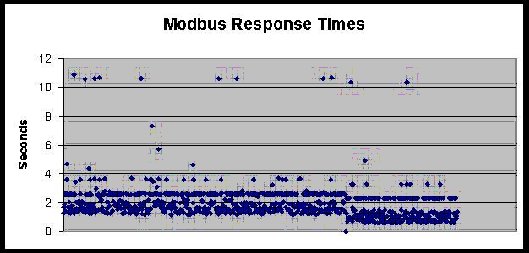
For example, here is a chart of 1000 Modbus/RTU polls over cellular TCP/IP. There is a random delay between polls of 30 seconds to 30 minutes. The patterns are rather striking: most polls complete in between 1 to 2 seconds, but there is clearly some systematic "aliasing" causing responses to complete in 2.8, 3.8, and 10.8 seconds.

chart showing Modbus times


After years of troubleshooting customers systems, I have been creating a running document and commentary on Bad things host apps do. I will be publishing these things over time in this blog. But to summarize:
  • The default OS timeout on opening TCP Sockets may be too short.
  • Attempting to open TCP sockets to unresponsive remotes must be a controlled process, since retries cost money.
  • Since all packets and retries cost money, all aspects of the implemented protocol must be controlled and adjustable.
  • OS stack calls may not return if the OS fails to detect a response or socket failure.
  • Responses from the remote could take 15 to 60 seconds.
  • TCP segment fragmentation and reassembly is exaggerated; can have many seconds of delay between fragments.
  • TCP sockets idle longer than 5 minutes often go away without error or detection.
  • Every byte your application sends (or resends) costs your customer money.

Thursday, October 12, 2006

Siemens PLC via Cellular

We succeeded in getting a Siemens S7-226 with CP243 and PPI serial up on the Digi Connect WAN, which is a cellular router for GSM or CDMA with local Ethernet and serial port.

In Summary:

  • To talk to S7-226 by serial PPI, you need a newer Siemens PC-to-PPI cable - the older one doesn't work. I am not sure why, but that is what we found. Using Digi RealPort we enabled a redirected COM port to the remote Digi Connect WAN's serial port, which is connected to the PPI port of the S7-200. We then defined a radio modem port within MicroWin using that COM port. Although a 30 second timeout would be ideal, MicroWin only gives options for 1, 10 or 100 seconds of timeout. You should probably select the 100 seconds to minimize your comm costs. Now MicroWin or Step7 can freely connect to and reprogram the S7-200. The high end-to-end latency of the cellular IP networks makes the performance pretty sluggish when compared to direct serial, but it works.
  • To talk to S7-315 by serial MPI, you need the special Siemens PC-to-MPI cable. Just as with the S7-200, we set up a redirected Digi RealPort, however we did NOT need to fool Step7 into thinking this was a radio modem. It just worked fine as is when given longer timeout settings.
  • To talk to CP243 by S7 protocol over ISODE on Ethernet, we enabled TCP port forwarding of port 102 on the Digi Connect WAN to the CP243 module. The CP243 is configured to treat the Digi Connect WAN as its Gateway IP. This also worked fine as is when given longer timeout settings.

Monday, October 09, 2006

Using Python to query Modbus slaves

I use Python ( http://www.python.org/ ) at lot in my testing. It is a language designed to make a programmer's life easy and the computer sweat - in other words, it is an ideal tool for test scripts and maybe a bad tool for "constant use" tools.

Stock python has no serial support. For serial, you'll need some serial tool like pyserial - this hides details of OS and allows Linux (or Windows) style serial calls on either OS. A web search of pyserial will turn up a download site - such as http://pyserial.sourceforge.net/ . The "Vaults of parnassus" is another nice source for Python tools including pyserial. http://py.vaults.ca/~x/parnassus/apyllo.py/

Creating binary messages is not hard in Python, but a bit ugly. You use lots of "chr(x)" function to build up a binary string and to parse a binary response lots of "ord()". Other than that, look at the spec at http://www.blogger.com/www.modus-ida.org for details of the actual protocol.

CRC-16 for Modbus (or DF1):
Here is my CRC16 routine including a few test cases (written with no regard for CPU speed, since that is not why one uses Python).

crc16.py as a ZIP file

Friday, October 06, 2006

Better not try to use "unlimited data"

When a potential customer starts talking to me about cellular data access to their telemetry devices, I start the discussion with the basic monthly costs of cellular data. Business cellular plans make you pay for what you use; every byte you send potentially costs you many. Of course, the natural reaction from potential customers is "Oh, that's no problem ... I'll just sign up for one of those 'unlimited plans' I see advertised all the time". When I point out these plans are available only for consumers, the natural reaction is to say "Oh, I just won't tell them this is for business ..."

I'll put on hold a moment the debate of "do unlimited data plans really exist?" and get back to cellular data access to telemetry devices. Today (and perhaps forever) cellular data access only makes sense if you have your data access well defined and under-control. If you poll X words of data every Y minutes, you will be able to select a monthly data plan that fits within a planned budget. If you connect to remote equipment for limited diagnostic maintenance and you understand that the cellular overage charges could cost you X dollars per hour, you will be able to manage your monthly bills. However, if you approach cellular data access to telemetry devices by saying you need to poll as much data as fast as you can, then this is NOT the correct technology for you. You are better to look at the various long-range Ethernet line-of-sight radios.

So back to the question of "do unlimited data plans really exist?" Hmm, unlimited - sounds nice, doesn't it. Yet an Internet search for "+unlimited +internet +cancelled" shows a growing collection of frustrated people with DSL or cable broadband, wireless PDAs, voice-over-ip (VoIP), and cellular plans who have had their "unlimited services" cancelled because they (ta-da) moved too much data. It seems unlimited doesn't really mean unlimited. I could provide links to such information, but the sites tends to be full of wild ranting language, plus I don't want to single out just a few companies. Do the search above and you'll find examples for any type of service you desire.

While I can empathize with the ranters who've found out that unlimited just means "without a predefined limit", as a network professional I understand the basis for these service cancellations. It would be nice if the marketing hype-sters could be honest enough to stop using the term "unlimited", but then no user would sign up for an honest broadband service stupid enough to define limits when competitors are shouting about "unlimited plans".

All IP-based broadband systems consist of a series of hops or links, each with a predefined maximum data throughput. All commercial broadband services try to handle as many customers as they can sign up. Therefore the performance a user sees is merely a function of how many other users are active at that instant, how much data they are trying to push through at that instant, and what is the limiting throughput of the system bottlenecks. As a business person seeking to make money, would you prefer to keep 100 users paying $80 monthly to each move 100MB of data per month (10,000MB/month), or prefer to keep the one user paying $80 monthly to move 10GB (10,000MB) of data per month? While this is an extreme example, as soon as a few of the 100MB/month users complain to the broadband service about their high-speed internet seeming pretty slow speed, the solution is obvious to the business-minded. Canceling the "unlimited service" of the one user moving 10,000MB/month will effectively double the performance of the other 100 users with no added expenses and a mere loss of $80 per month of income. Failing to cancel the "unlimited service" of the one heavy user risks causing 10 or 20 of the other 100 light users to change services with a potential monthly income loss of hundreds or even thousands of dollars. I am not saying this is honest to cancel "unlimited service" based on high usage. I am just saying it is understandable and makes business sense.

How is this cancellation legal? Easy - just read the huge terms of service contract you agree to when you sign up for unlimited data service. To generalize some typical clauses in an unlimited cellular service plan:
  • You agree to only use it for internet web browsing and email checking
  • You agree to not download or upload files
  • You agree to not use streaming media or peer-to-peer file sharing
  • You agree to not run any application servers or data services
  • You agree to not use the service as a replacement for a wired data circuit
  • You agree to not use the service as a backup for a wired data circuit
  • You agree that the service provider can cancel the service without notice if your usage impacts the operation of the service or other users of the service

In other words, you agree to use the cellular data service as a typical consumer with a notebook PC or PDA who spends at most an hour or two daily accessing the internet. I hope by now you can see how difficult it will be to fool any cellular service provider for long that your telemetry data system was just a normal consumer.

Friday, September 29, 2006

Cellular data - like a DSL or Cable Modem, but ...

Most potential users assume cellular data modems are just a newer form of the old Hayes AT-style analog dial-up modems - you know, your old ATDT {phone-number} interface. While there are a few old, rapidly obsoleting standards which work like this, all modern cellular data systems are IP-based. They operate much like your home Cable or DSL modem. Your cellular data modem links and authenticates to your ISP (or "carrier") and is assigned an IP address - just like your home Cable/DSL modem. There are no phone numbers to dial; your modem is "connected" as long as it is powered up. Your charges relate only to IP packets moved without any concept of minutes connected.

But ... marketing hype-aside, current and near-term cellular systems are NOT broadband as you or I would use that term. Ever used a cell phone and had a call drop? A voice garbled beyond recognition? No signal now even when you had one an instant ago? The same variability applies to cellular data networks. Cell towers do their best to share the air waves with all users; thus the speed and latency in your data movement is deeply impacted by both location and what other cellular users are doing.

In my world it is even worse ... this meaning people who use IP networks primarily for telemetry or data collection with small, cyclic polls for data. While you'd think this would be a natural fit for cellular data networks, it turns out to be fairly abnormal when viewed in the context of how the standards have been evolving. Every new advance in cellular data networks is aimed at pumping up throughput for web browsing, email exchange, or image/music downloads. New advances are aimed at your average human user with a PDA, notebook computer, or iPod; users who pay lots of cash per month for a single account with little concern for Return-On-Investment (ROI). Parents of teenagers know this best - what is the ROI of the $50 to $200 monthly the average "wired" teenager seems to spend? My youngest daughter spent an amazing three years during high school working part-time at a noisy place with video games and a big dancing mouse to pay for her cell phone usage.

In old-fashioned network terms, these are connection-oriented paradigms where larger latency & overhead is invested to initiate the connection as a tradeoff to having less cost to move each fragment of a large amount of data. Without going into too much detail, understand that traditional digital cellular voice calls can be viewed as small streaming media sessions. Each cell phone negotiates a strict series of repeated tiny time-periods during which it can send the next small digitized and compressed portion of your conversation. You can visualize this as an impossible juggling act where a few dozen assistants arranged in a star around an old juggling pro set up a rhythm and tempo that passes their pins in and out without a hiccup. Each pin must be launched at the exact correct instant to find an empty hand waiting on the other side. (Note that CDMA uses a different paradigm than these GSM "slots", but the need to share a limited resource is the same.)

The 2G/2.5G cellular data networks (slightly past state-of-the-art) functioned by just mimicking a voice call but substituting small chunks of pure data for the compressed slices of voice. Later advances to these standards allowed the tower and data modems to negotiate more or fewer of the tiny time-periods per second to better match the actual data throughput. Thus your perceived data network throughput can grow or shrink as the tower as fewer or more voice calls to handle. But breaking data up into a whole series of contiguous tiny time periods separated by overhead is very inefficient. So a key evolution in the latest standards is the ability of the tower to in effect negotiate consolidating a block of contiguous tiny time periods into fewer, longer time period.

Ok, enough over-simplified details - back to why telemetry data is abnormal in this world of "Cellular Broadband". Lets say every 15 minutes I send a Modbus/RTU poll that consists of 8 bytes of data into my 400kbps to 3mbps "Broadband" connection ... well, I'll get my blazingly fast 100 bytes response back in from 2 to 5 seconds. Hmm, sounds a lot like the performance of an old 600bps (600 baud) radio modem! So cellular data networks have fairly large latency when small infrequent amounts of data are moved. This goes back to the "juggler" paradigm I mentioned before. If your cellular device has no data to send after some number of seconds, the cell tower asks it to "stop juggling" - your device gives back its allocated tiny time-period(s) to be reused by other voice or data devices. After all, there are just so many of these periods to be shared by all users. So the process of the tower and data modem reallocating these tiny time-period(s) is the primary source of this large, variable latency.

Web browsers won't notice this latency since once the web page request is sent up, the page content just flows rapidly down in multiple TCP/IP streams without the explicit poll/response behavior of a telemetry session. Since the data exchange between the tower and cell modem is active and heavy, the tower does its best to bump up and allocate as much bandwidth to the cell modem as it can spare. This is where the elusive "Broadband" performance is able to peek out.

Today, your data modem needs to send data at least every 40 seconds to avoid this latency, but with 3G this will drop to every 3 seconds - which would be cost prohibitive. You say just get an unlimited plan? Sorry, no such thing, but that will be my next blog entry.

Want more details? See Also:
http://www.gsmworld.com/index.shtml
http://electronics.howstuffworks.com/cell-phone.htm/printable

Introduction

Hello and welcome to my blog. I am scheduled to update this at least weekly, although at times I may be more prolific.

I have worked in pushing industrial protocols through Ethernet and IP for nearly 2 decades. This means using TCP/IP or UDP/IP to communicate between devices on a local or even world-wide scale. At present my job involves use of cellular networks, so most of the blog will focus on "adventures" in fooling poorly-written Ethernet applications to talk to a remote IP address.

Topics to cover:
  • How to write cellular/satellite friendly host applications
  • How to work around poorly written host applications
  • Over time I'll slowly discuss various common industrial protocols and how well they do or don't work to remote IP addresses.